|
 |
|||||||||||
| |
|
|||||||||||
      |
||||
| . |
|
|
|
Terms & AUP | UCE/SPAM Policy | CGI Abuse Policy | Bandwidth Usage Policy | Payment Policy | Privacy Policy |
|
How to setup a 'catch all' e-mail address? 2. Login to the Plesk
Control Panel with your username and password 3. Click the
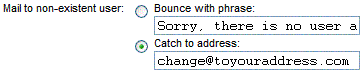
'Preferences' button once you have logged in. 4. You should now see this: 5. You need to click in the 'Catch to
address' button, then enter your address you would like all mail to be
bounced to. You can use an address at your own domain if you wish, but
be sure to setup a mailbox with the alias first, otherwise mail will get
stuck in a loop. 6. Scroll down to the bottom of the
page, and click 'Update' You should of now created your
"catch all" e-mail address for your account. Remember: In order to receive
mail, which finds its way into your "Default Mailbox", you must
configure the default address in your mail reader. If you don't, then all
mail, which bounces to this address will sit on the server unread. This is
easy to do in Outlook Express, as it allows you to configure and monitor
multiple email accounts. Email readers such as Netscape on the other hand,
are limited to "one" email account. Actually, you could
re-configure your mail reader to check your default email box every few days,
but who wants to be bothered with that trouble? We suggest using an email
reader, which allows you to configure multiple email accounts. You can also check your default email account, or other mail account by logging into it through the "WebMail" interface. The downside of enabling "Catch
All": On the other hand, if you're using
"specific pop email accounts", you could opt to disable the
"catch all", which would mean that "only visitors or associates
who you've given a specific address to" can send mail to a particular email
account on your domain. In this case, everything else, (that you have
not configured as a pop mail account) is bounced back to the sender. In our
opinion, we suggest leaving your "catch all" enabled for the time
being. If Spammers begin sending random junk messages using anything@yourdomain.com,
then you can disable your "catch all" feature. How can I force all unresolved email to bounce back with a specific message? |
 |