How do I change my FTP password?
1. Load your Plesk Control
Panel.
This can normally be found at
https://www.youdomain.com:8443 if you did not know already.
2. Login to the Plesk Control Panel with your
username and password
3. Click the 'Hosting' button once you have
logged in.
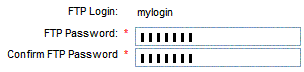
4. On the Hosting page, you should see:
5. Enter the new password in the first box, and
confirm again in second box
6. Scroll down to the bottom of the page and
click 'Update'
You have now successfully changed your FTP
password.