|
1. Load your Plesk Control Panel.
This can normally be found at
https://www.youdomain.com:8443 if you did not know already.
2. Login to the Plesk Control Panel
with your username and password
3. Click the 'Report' button once you
have logged in.
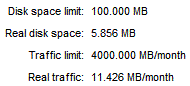
4. On the Report page, you should see:
5. Real disk space = amount of
disk-space you have used
6. Real traffic = amount of bandwidth
you have used
From this page, you can also see:
| -
[Account] Creation Date |
|
| -
FTP Login |
|
| -
FrontPage Support |
[FrontPage
Extensions] |
| -
SSI Support |
|
| -
PHP Support |
|
| -
CGI Support |
|
| -
Web statistics |
[enabled
y/n] |
| -
Apache Error Documents |
[enabled
y/n] |
| -
Domain user |
[enabled
y/n] |
| -
Anonymous FTP |
[enabled
y/n] |
| -
Mailboxes |
[Number
of mailboxes created] |
| -
Mail Groups |
[Number
of Mail Groups] |
| -
Autoresponders |
[Number
of Autoresponders set up] |
| -
Web users |
[Number
of Web users created] |
| -
Databases |
[Number
of MySQL Databases on your account] |
|